Making Your Site Agent-Friendly: llms.txt and the Two-Audience Problem
I asked Claude Code the same question twice: “Can you find interesting articles today?” and pointed it at the AI SOTA feed bot.
The first time, without llms.txt, the agent fetched the homepage (24KB of HTML), realized it couldn’t parse the rendered JavaScript UI, then hit the raw API endpoint and pulled down 323KB of JSON. It worked, but it was brute force — the agent had to guess where the data lived and figure out the response format on its own.
The second time, with llms.txt, the agent fetched the 2.3KB guide first, immediately knew to call /api/feed?limit=30, and came back with a cleanly categorized summary — model releases, practitioner tools, research picks — in half the time.
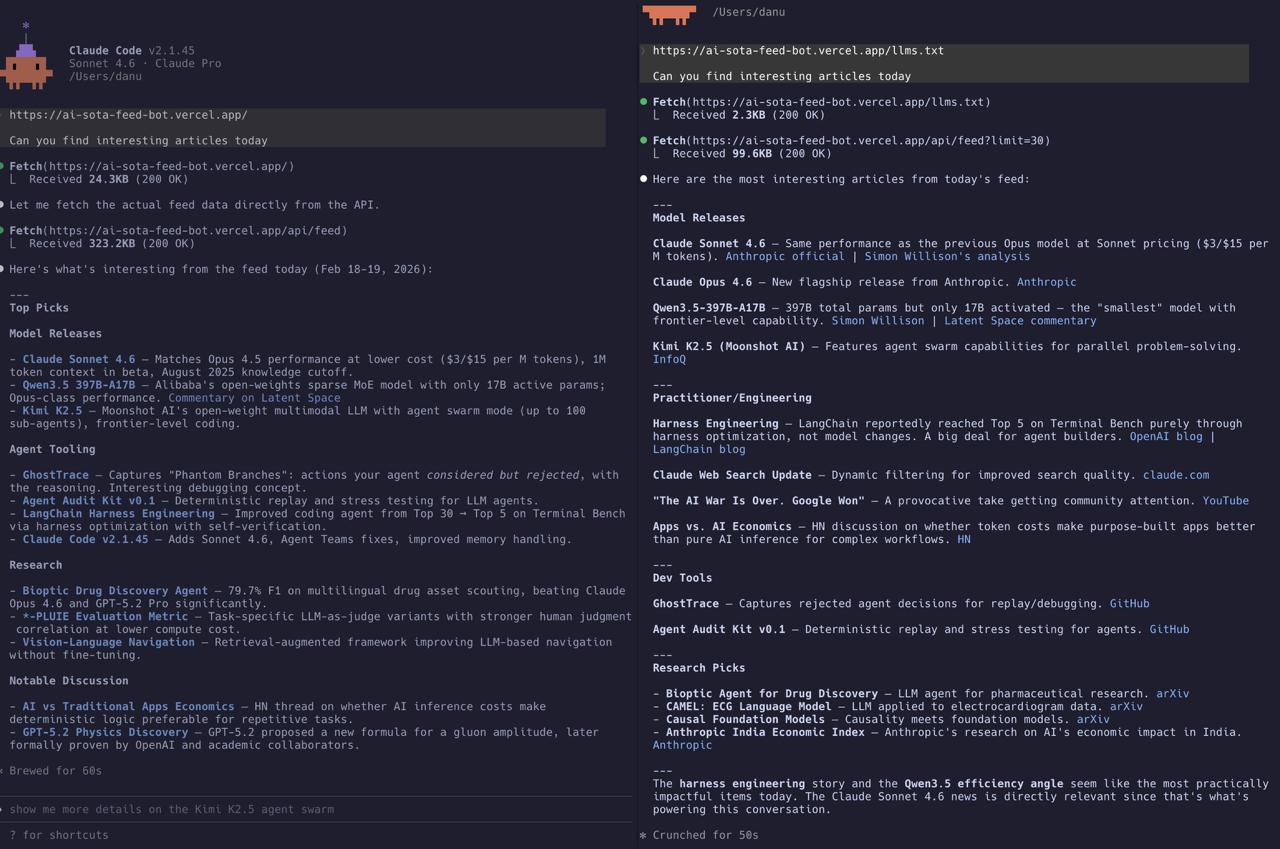
Same site. Same question. Dramatically different experience.
What is llms.txt?
The idea is simple: just like robots.txt tells web crawlers what they can access, llms.txt tells AI agents how to navigate your site. It’s a plain text file at /llms.txt that describes:
- What your site is
- What endpoints exist
- How to use them
- What to expect in the response
It’s an emerging convention — not a formal standard yet, but increasingly adopted by sites that expect AI agent traffic. The insight behind it: LLMs can read and follow instructions, so why not just tell them how your site works?
What Harry built
When I asked Harry to add llms.txt to the feed bot, he created two files:
/llms.txt — the quick-start map:
- Site description and purpose
- Endpoint list (
/api/feed,/api/rss,/api/events,/api/client-config) - Recommended access path: “Fetch
/api/feed?limit=200, readrunsmetadata for freshness, use item fields for filtering” - API query parameter reference (from/to, limit, label filtering, tier-1 blend knobs)
- Common task recipes: “top frontier updates today”, “only platform items”, “recent OpenAI coverage”
- Known caveats (time window presets, slot diversity constraints)
/llm-guide.txt — the deeper playbook:
- Reading strategy: “inspect
runs[0].run_atfirst to confirm freshness, prefer API fields over HTML scraping” - Filtering by label, source, and time
- Troubleshooting guide for “missing items” (time window? slot caps? deployment lag?)
- Field interpretation (what
v2_slot,v2_final_score,labelsmean) - Even a suggested prompt template for downstream tools
Then he wired both files through vercel.json rewrites so they’re accessible at clean URLs, updated the README, and deployed.
The whole thing took about 60 seconds. One prompt, one commit.
Why it matters: the 323KB vs 2.3KB story
Without guidance, an AI agent approaching an unfamiliar website does what any confused visitor does — it starts clicking around. Fetch the homepage. Try to parse the HTML. Realize the content is JavaScript-rendered. Fall back to guessing API endpoints. Download everything and hope for the best.
This is expensive. Not just in bandwidth (323KB vs 2.3KB), but in tokens. An LLM processing 323KB of raw JSON is burning through context window for data it doesn’t need. Most of those feed items aren’t relevant to the user’s question. The agent has to do its own filtering, its own categorization, its own deduplication.
With llms.txt, the agent gets a map before it starts exploring. It knows:
- Which endpoint to hit
- What parameters to pass
- What fields matter
- How to interpret the results
The result on the right side of the screenshot speaks for itself: clean categories (Model Releases, Practitioner/Engineering, Dev Tools, Research Picks), relevant links, and an editorial note about what’s most impactful — all from a focused 99KB API call instead of a 323KB blind download.
The two-audience problem
Every website now has two audiences: humans who browse and agents who fetch.
Humans want:
- Visual hierarchy, nice typography, interactive UI
- Click-to-expand, hover states, dark mode toggles
- Pagination, filters, time preset buttons
Agents want:
- Structured data with predictable fields
- Clear endpoint documentation
- Query patterns for common tasks
- Guidance on what fields mean
These needs are fundamentally different. You can’t serve both with the same interface. A beautifully designed React SPA is great for humans and terrible for agents. A raw JSON API is great for agents and unusable for humans.
The feed bot already had both — a reader UI for humans and a /api/feed endpoint for programmatic access. What was missing was the bridge: documentation that tells agents the programmatic access exists and how to use it.
That’s what llms.txt is. It’s not a new API. It’s not a new feature. It’s a signpost — a 2KB file that says “hey agent, don’t scrape the HTML, here’s where the real data lives.”
Implementation notes
A few things Harry got right that are worth calling out:
Two-tier documentation. llms.txt is the quick map — enough for most agent tasks. llm-guide.txt is the deep reference for complex queries and debugging. This mirrors how good API docs work: a quickstart and a full reference.
Task-oriented examples. Instead of just listing endpoints, the docs include common task recipes: “top frontier updates today” → use this query. This is more useful for LLMs than abstract parameter descriptions because they can pattern-match directly.
Caveats section. Telling agents about known gotchas (time window presets hiding older items, slot diversity constraints filtering out valid items) prevents the most common failure mode: an agent fetching data, not finding what the user asked about, and reporting “it doesn’t exist” when it’s actually just hidden by a filter.
Suggested prompt template. The llm-guide.txt ends with a literal prompt that downstream tools can use. This is like shipping a code example — it removes ambiguity about intended usage.
Should you add llms.txt?
If your site has any programmatic interface (API, RSS, structured data), yes. It takes 15 minutes and immediately improves every AI agent interaction with your site.
The cost is negligible: two text files and a route configuration. The benefit is that every agent visitor — Claude, GPT, Gemini, or any MCP-connected tool — gets a structured map instead of having to reverse-engineer your site.
Think of it this way: you already have robots.txt for crawlers and sitemap.xml for search engines. llms.txt is the same idea for the next generation of automated visitors.
And as the screenshot shows, the difference isn’t subtle. It’s the difference between an agent that fumbles through 323KB of HTML and one that delivers a curated, categorized briefing in seconds.
The feed bot is live at llm-digest.com — try hitting /llms.txt yourself. Previous posts: two analytics approaches and splitting the pipeline.