Writing Plugins Is Cheap. Apps Can Be Custom.
Paseo has a chat UI for coding agents that is easier to read than a terminal, especially on a phone. When an agent read a screenshot, though, the chat showed one text row: Read /tmp/screenshot.png. The agent had looked at an image and I could not see it.
I fixed that with a Paseo plugin, without changing Paseo itself. Then I got curious about the other apps I use. Claude Code and Pi both already ship extension systems, so I read their extension sources, and then I went back and looked at my own.
Pluggable architecture is old. What is new is that agents can write the plugins. An agent can read a host’s examples and produce an extension in an afternoon. When that is cheap, an app can be different for each user. The hard part is what the app does with the code.
Every extension runs inside rules the app sets: when your code is called, what it receives, what it may return, and how it may act. I will call that set of rules the contract, and the app that sets it the host.
Two of the extensions below are examples their repositories ship, and one is mine. They do different things, but the same four questions shape all of them. The interesting part is which answers the host enforces and which it only trusts.
Four things every host decides
Claude Code calls its extensions mods, Paseo calls them plugins, and Pi calls them extensions. Underneath the names they are the same arrangement: code the host loads, then calls at moments the host chooses.
In Claude Code a mod is a folder whose hooks/hooks.json points at one file. The host loads the file, calls register(on) once, and keeps every function passed to on(...) in a table from event name to functions. When the event happens, the host builds the event data, freezes it, and calls the first function in the list.
The smallest useful mod is a guard:
export function register(on) {
  on('tool.call', { tool: 'Bash' }, async ($, e, next) => {
    if (/git push .*--force/.test(e.command)) {
      return { deny: 'Force pushes are not allowed in this repository.' }
    }
    return next(e)
  })
}
e is the event. next passes it to the rest of the chain, which ends in Claude Code’s own behavior. $ is the host’s API and the only way to act, for example $.process.run to run a program. The function runs inside Claude Code’s own process.
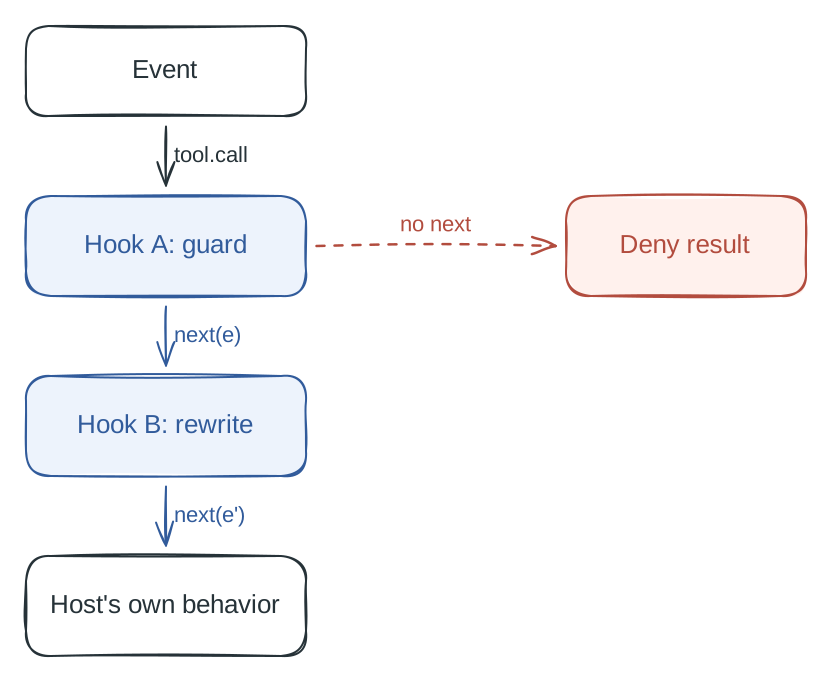
Figure 1. Each hook wraps the next. A hook that returns without calling next ends the chain.
Every host fixes the same four things: when it calls you (event names), what you receive (event data), what you may return (next(e), { deny }, { block }), and how you may act ($, the pi object, a CLI). What changes from host to host is how much of that it enforces. A return value the host reads and acts on is a hard edge. A message the host forwards to the model is a suggestion. And none of the three hosts sandbox the code itself, which matters at the end.
Claude Code: Blast Radius counts what a command would destroy
Claude Code asks whether to allow a Bash command before it runs. But whether the command is rm -rf build or git reset --hard, the prompt shows one line of text and does not say what Allow will destroy. Blast Radius is an example in Anthropic’s claude-code-playground repository that fills that gap. Just before a risky command runs, it shows what the command would change, in numbers, and then runs or refuses it depending on the button you press.
It watches the Bash commands that destroy work: rm -r or rm -f, git reset --hard, git checkout -- ., git clean, a force push, and database migrations. A plain deny rule would stop all of them. Blast Radius measures first, shows the result, and asks.
The measuring uses dry runs through $.process.run. git clean -n lists the files that would be deleted. git status --porcelain and git diff --shortstat show the uncommitted work a reset would lose. For a force push it counts the remote commits that would be dropped. The numbers go in a pane next to the chat with two buttons, Proceed and Cancel. Cancel is focused, so pressing Enter refuses.
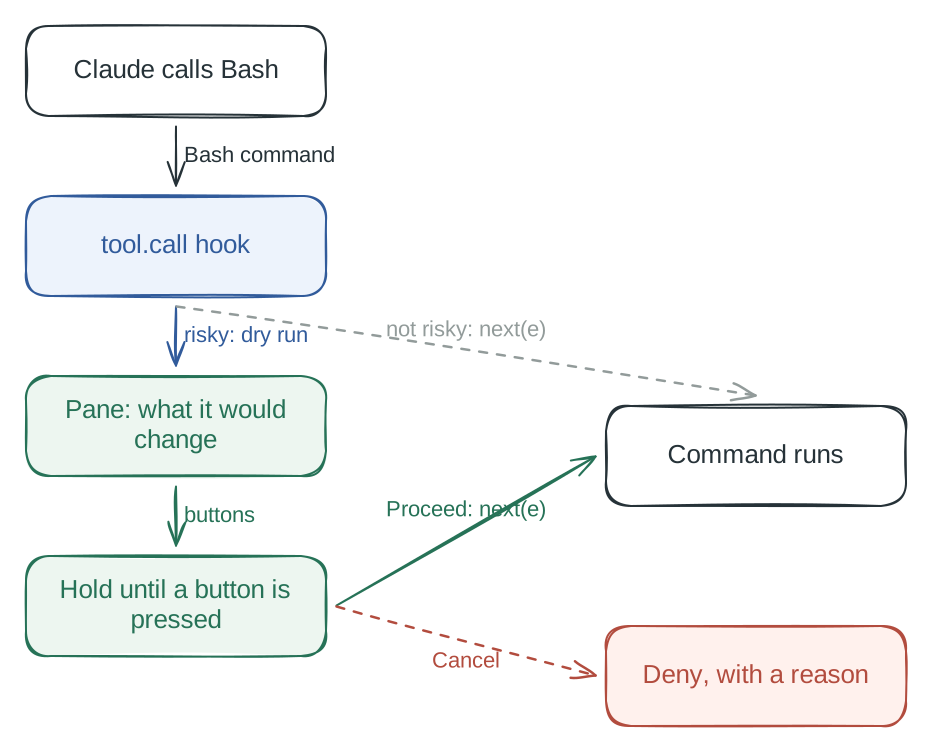
Figure 2. The hook waits for a person inside the tool.call event.
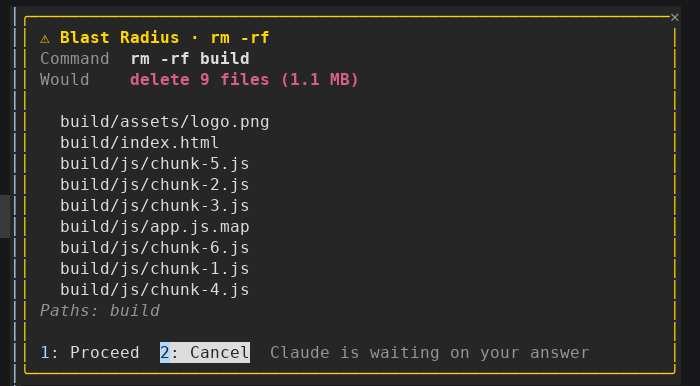
Figure 3. Blast Radius holding rm -rf build in a real Claude Code session. The pane lists what would be deleted and waits for Proceed or Cancel. Screenshot from Anthropic’s claude-code-playground.
The return value is the hard edge here. A hook that returns { deny, reason } stops the command, and the reason comes back to Claude as the tool result. Three constraints shaped the rest.
The hook gets 10 seconds of its own time, and a person needs longer. The mod gets around it because time inside a $ call does not count. So the hold is a loop that runs sleep 0.25 through $.process.run until a button press sets the decision, capped at 10 minutes. The host’s budget decides the shape of the code.
A mod’s hooks share the variables in its file, so a module-level held variable lets the mod allow one hold at a time. If a subagent runs a risky command while the first pane is open, it waits its turn instead of stacking a second pane.
The mod fails closed. A timeout, an error or an interrupt returns a deny with a message: Blast Radius held this command and did not run it, and Claude should not retry unless the user asks. That message is addressed to the model, because the return value goes back as the tool result. When the terminal is too narrow for the pane, the mod falls back to a band above the prompt.
The host does not check the dry runs. The numbers in the pane are the mod’s own code, running with the user’s permissions, so the evidence behind the Proceed button is as trustworthy as the mod is.
Pi: plan mode is assembled from events
Pi ships without sub-agents and plan mode, and its README says so. The plan-mode example in the repository builds plan mode as an extension in about 400 lines. Pi has no slot labelled plan mode, so the extension assembles the mode from the events Pi already exposes.
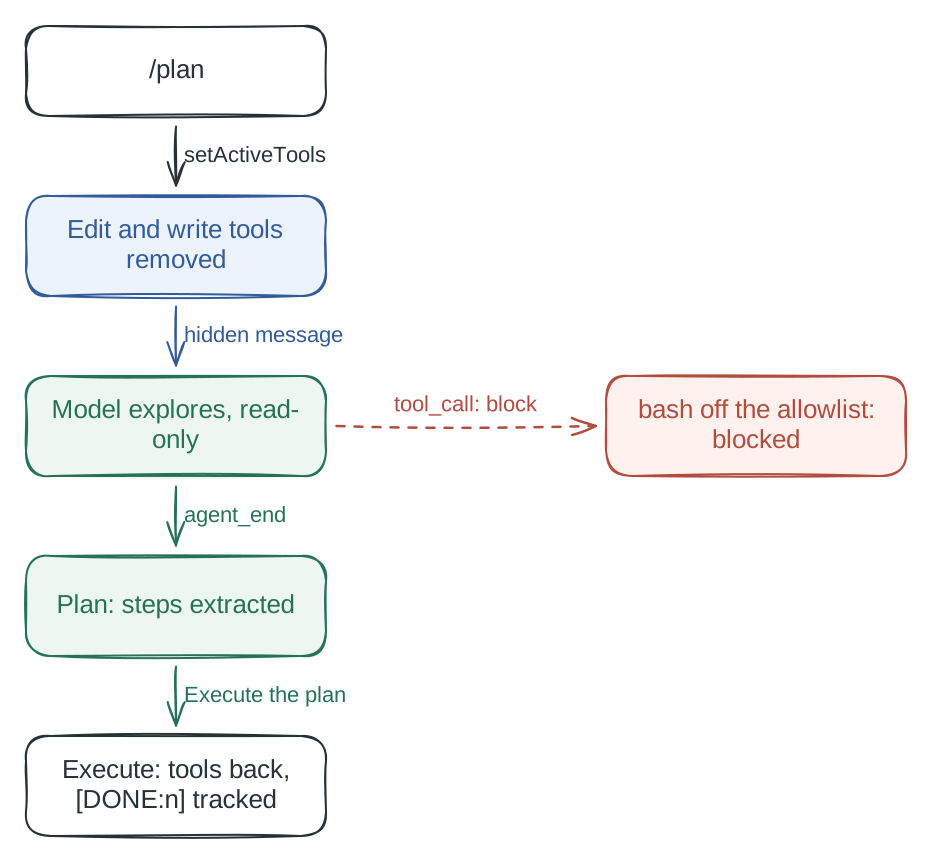
Figure 4. Plan mode is assembled from separate events.
Two of the pieces are hard stops. Entering the mode, through the /plan command, the --plan flag or Ctrl+Alt+P, calls setActiveTools to remove edit and write from the tool list, so the model cannot call them at all. Removing tools is not enough, because bash can still write files. A tool_call handler blocks any command that is not on a read-only allowlist and returns { block: true, reason }. The reason goes back to the model: “Plan mode: command blocked (not allowlisted). Use /plan to disable plan mode first.”
The rest of the mode is text the model is asked to follow. A before_agent_start handler injects a hidden message that begins “[PLAN MODE ACTIVE]” and tells the model not to change anything, and a context handler filters it out once the mode is off so stale instructions do not stay in the history. An agent_end handler reads the model’s last message, extracts the numbered steps under a Plan: heading, and shows a menu. Choosing “Execute the plan” restores the tools and asks the model to put [DONE:n] after each step; a turn_end handler looks for those markers and updates a progress widget. The extension saves its state with pi.appendEntry("plan-mode", ...) and restores it on session_start, so the mode survives a resumed session.
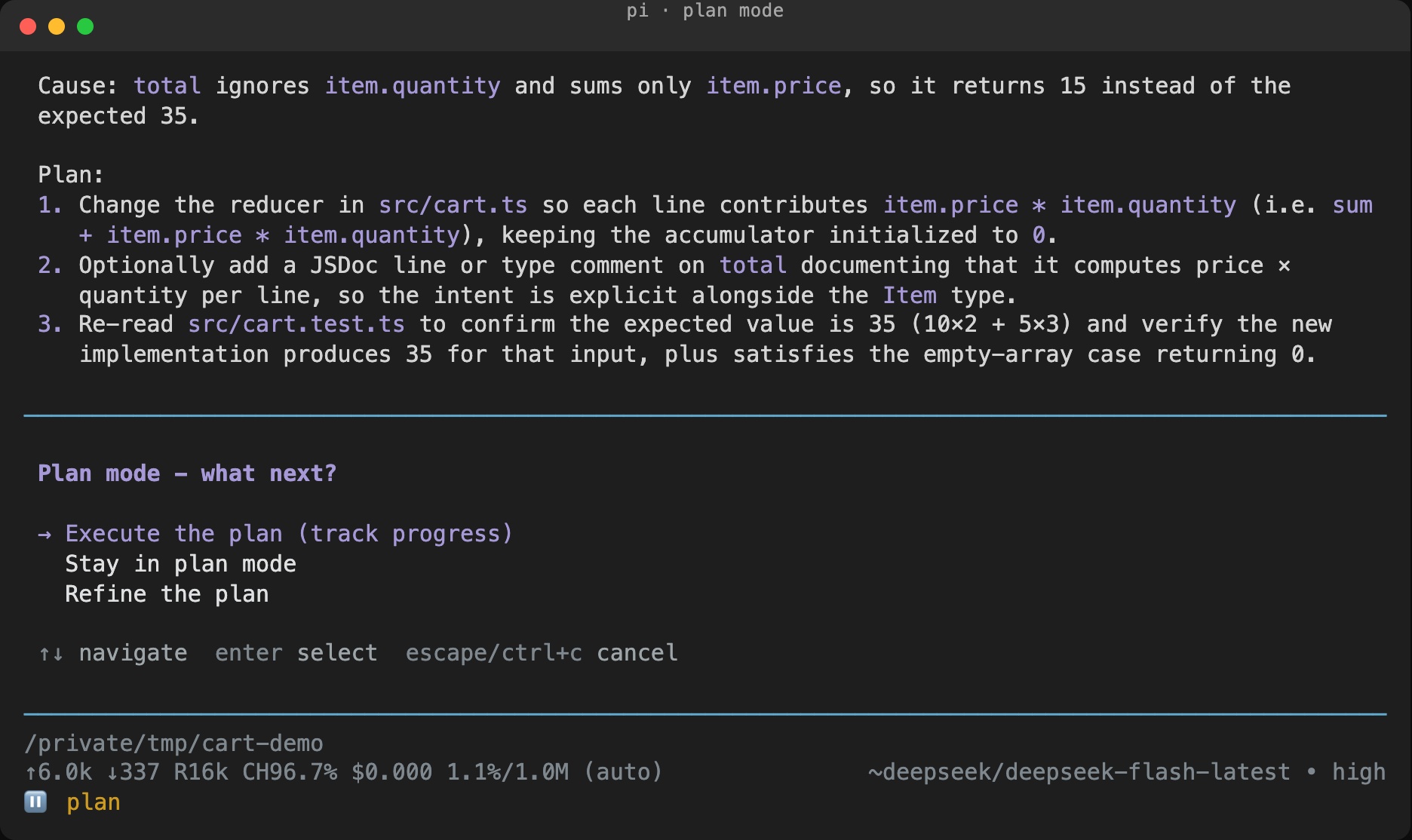
Figure 5. Plan mode in a real Pi session: the extracted steps, the execution menu, and the plan status in the footer.
That split decides what happens when the model slips. The Plan: heading and the [DONE:n] tags work because current models follow format instructions well. If the model leaves out the heading, the extension finds no steps and does nothing: the “Execute the plan” menu does not appear, and nothing else breaks. A format slip costs one feature and does not touch safety, because safety lives in the two hard stops.
The allowlist is not a security boundary. It stops the model from editing files by mistake. The extension itself runs with the same OS permissions as Pi.
Paseo: a plugin that replaces one kind of row
My problem was in Paseo’s timeline. When an agent reads an image file, Paseo shows a tool row, and the row is text. The inline-image-preview plugin replaces that row with the image.
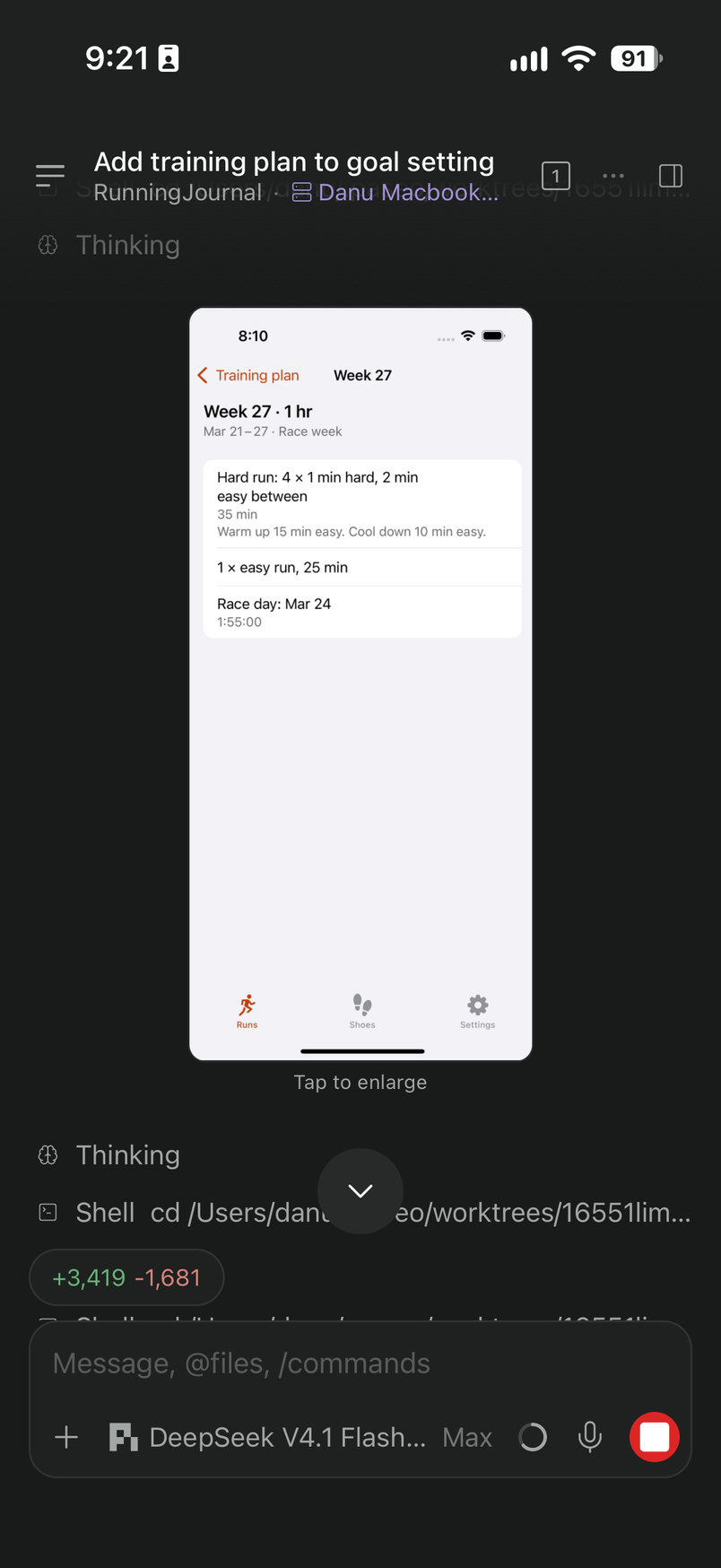
Figure 6. With the plugin, the screenshot the agent read appears in the middle of the conversation, between its other steps.
A Paseo plugin has a client entry, index.client.tsx, and a server entry, index.server.ts. The client code ships inside the app, so the same code runs on iOS, Android and the browser. The server code runs in a subprocess beside the daemon with Node access. This plugin uses three pieces.
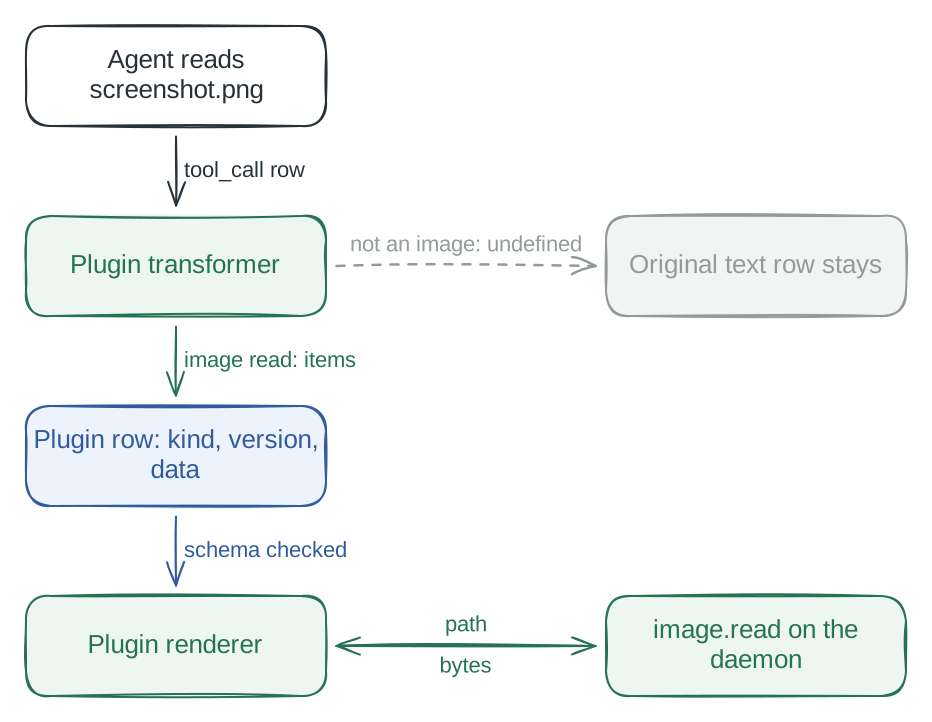
Figure 7. The transformer swaps the text row for an image row.
- A transformer registered with
addTimelineTransformerlooks at eachtool_callrow. If the row reads an image, from a file path or from base64 or data URIs, it returns a plugin row of kindinline-image-previewwith up to 8 images. If not, it returnsundefinedand the original row stays. - A renderer registered with
addTimelineRendererdraws the image and opens a full-screen view on tap. - A handler,
image.read, runs in the daemon subprocess. It reads a file of up to 20 MiB in PNG, JPEG, GIF, WebP or BMP and returns base64, because a phone cannot open a file on the machine that runs the daemon.
Here the enforced part of the contract is the row. The transformer runs on every streaming update while Paseo builds the render model, and it returns undefined to keep a row, items to replace it, or an empty array to remove it. Whatever it returns has to be JSON and has to match a schema the plugin registered; Paseo validates it before the renderer sees it. The version field tells the renderer which data shape to expect.
The client cannot import Node modules, so reading a file can only happen in the handler, and the RPC between client and server is defined with zod schemas in a shared folder. Because the row data must be JSON, the row carries a path and the renderer fetches the bytes over RPC. The image never goes through the timeline.
Because a transformer that does not recognize a row returns undefined, a mistake leaves the original text row on screen. The plugin falls back to the app’s own behavior.
The host can also change underneath a plugin. Newer Paseo releases draw tool-result images natively, so the transformer skips rows that already carry the native [image] placeholder. Otherwise the same screenshot would appear twice. The plugin had to yield to the host, not the other way around.
How far each host allowed the extension to go
| Extension | What it changed | What the host’s contract forced |
|---|---|---|
| Blast Radius Claude Code, in its own process | Whether a Bash command runs, after a person decides | A 10-second hook budget, so the wait is a $ polling loop. Results go back to the model as text. |
| Plan mode Pi, in its own process | The tool list, which commands are allowed, the model’s instructions | Two hard stops (the tool list and tool_call), the rest as messages the model has to follow |
| inline-image-preview Paseo, client code and a daemon subprocess | How one kind of timeline row looks | A JSON row with a schema and a version, plus an RPC for anything that needs Node |
The differences are in the table. Two things are the same.
First, the host only does what it reads back. Claude Code and Pi read your return value and act on it, so one return can veto or rewrite. Paseo reads a row, validates it, and draws what passed. The more a host reads, the more protection it gets for itself and its users, and the less an extension can do outside what it reads.
Second, everything a host does not read is trust. In Claude Code the reason is a message to the model, and the dry runs are the mod’s own code. In Pi the Plan: heading and the [DONE:n] tags are text, and the allowlist guards against mistakes. In Paseo the judgment about what counts as an image belongs to the plugin. None of the three hosts sandboxes extension code: Claude Code mods run with the user’s permissions, Pi extensions have the same OS permissions as Pi, and Paseo calls plugin code trusted and unsandboxed. The contract limits what the host invites an extension to do. It does not limit what the code is able to do.
Back to the screenshot
I wanted one thing: to see the image the agent had read. Paseo let me change exactly one kind of row, and that was enough. I did not need a fork, a roadmap slot, or a conversation with the app’s team.
An extension system promises that the host will call your function at the moments it chooses, with the data it chooses, and act on the values it reads back. It does not promise the rest of the app. The work happens inside that shape, and the shape is visible before you write a line.
So when I look at a new host now, I read the four answers first, and then the permissions. The events tell me when I can act. The data tells me what I receive. The return value tells me how much the host will do with my answer. The API tells me how I may act. The permissions tell me what my code can do when the host is not looking.
The next extension I write, I will start there instead of at the docs’ example. The next app I build, I will spend the same four answers on purpose: which moments I open, what I hand over, what I read back, and what I leave unchecked.
Sources:
- Blast Radius, Anthropic’s claude-code-playground
- Claude Code: Mods reference, React to events with a mod and Use the mods API
- Pi extensions docs and the plan-mode example
- Paseo plugin docs